
How we built a system where AI can design, code, validate, and deploy full-stack dashboards from a single conversation.
by Rajib Bahar
with co-authors Ricardo Quintana and Eduardo Calzadilla
Imagine that a product owner types into a chat: “What if my mid-market fintech client could have a data migration health dashboard?“ Seven minutes later, they have a fully functional Next.js dashboard, deployed, accessible via URL, connected to data, interactive charts, and brand-appropriate styling. No templates. No boilerplate. Every line of code written by Cortex Code and Cortex agents.
That’s evolv RPE, the Rapid Prototype Engine.
It’s a multi-agent AI system that conducts a structured interview, designs data schemas and UI blueprints in parallel, generates production-ready Next.js code, validates and auto-repairs it, and optionally deploys it to Snowflake’s container services. All from a conversation.
In this post, we walk through the architecture, the agent pipeline, the frontend and backend design, and the hard-won lessons from 80+ versions of iterative development. Check out the demo below.
Mission: Bringing Use Cases to Life at the Speed of Thought
A typical POC custom dashboard can take up to two weeks to build. It requires copying a previous project, swapping out the data model, adjusting the color scheme, and determining the KPIs. This process works, but it’s slow, manual, and difficult to scale.
Templates help, but they’re inherently rigid. A BI dashboard for a healthcare company looks fundamentally different from one for a logistics firm, after all. The data entities are different. The metrics are different. The visual hierarchy is different. Templates tend to produce variations of the same prototype, rather than truly tailored solutions.
We needed something that could produce unique, client-specific prototypes. Not variations on a theme, but genuinely tailored dashboards where the data model, the visualizations, and the narrative all reflect the client’s actual business context.
Our Vision: Input natural language to create a working prototype, and get it done within minutes.
The Interview: Turning Conversation into Requirements
The first challenge was requirements gathering. You can’t just throw a one-line description at an LLM and expect a coherent dashboard. To generate something meaningful, the system needs context, including who the client is, the use case, what data exists, and what success looks like.
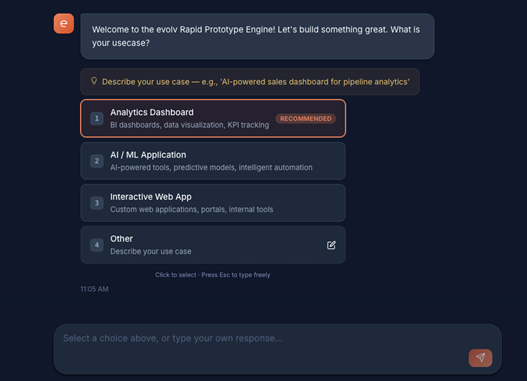
RPE solves this with a 10-category structured interview process. Instead of a single prompt, the system conducts a guided conversation that captures the information needed to generate a realistic prototype, while still feeling like a natural chat experience.
The interview flows through these categories in sequence:
- Use Case: What problem are we solving?
- Client Context: Who’s the client? (triggers web research)
- Company Metadata: Industry, company size, tech stack, annual revenue
- Use Case Alignment: Is this Data Migration, BI Analytics, AI/ML, or Security?
- Business Problem: Specific pain points the dashboard should address
- Desired Outcomes: What does success look like?
- Metrics & Signals: KPIs to track (with AI-recommended defaults)
- Data Assumptions: Data sources, synthetic data specifications
- Demo Expectations: Audience, format, “wow factor” priorities
- Confirmation: Summary review before generation begins
The user interface uses clickable choice buttons for structured inputs, color pickers for brand colors, and automatically generated company information cards that display researched metadata.
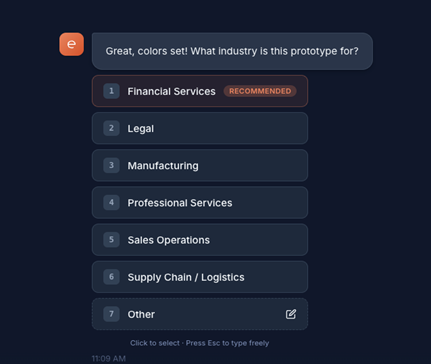
By the end of the interview, the system has enough context to design an application that feels plausible for the client’s industry and scenario.
The Agent Pipeline: Nine Agents, One Mission
The heart of RPE is a multi-agent pipeline where each agent handles one specialized concern. Rather than asking a single model to generate everything in one pass, the system breaks the process into specialized steps. Each agent handles a specific concern: architecture, UI design, validation, code generation, or deployment.
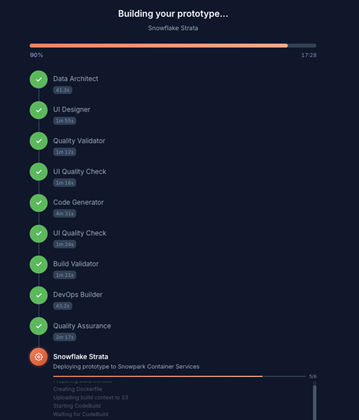
These agents are coordinated by an execution engine that manages dependencies and runs compatible steps in parallel. The result is a pipeline that behaves more like a distributed engineering team than a single AI prompt.
The Pipeline Phases
Here is the full execution flow:
Phase 1: PLANNING
Orchestrator Agent: Analyzes the interview output and generates a structured JSON execution plan describing the data model, UI architecture, and prototype structure.
This plan becomes the blueprint for the rest of the pipeline.
Phase 2: PARALLEL DESIGN
Two agents run simultaneously.
Data Architect Agent: Designs entities, relationships, and synthetic data specifications that represent the client’s business scenario.
UI Builder Agent: Generates the page layouts and component hierarchy that will shape the user interface.
Running these agents in parallel significantly reduces generation time while keeping the architecture aligned.
Phase 2.5: VALIDATION
Validator Agent: Cross-checks the data schema against the UI blueprint to identify conflicts before code generation begins. For example, it ensures dashboards aren’t referencing metrics or entities that don’t exist in the data model.
Phase 3: CODE GENERATION
Code Generator Agent: Generates an entire Next.js application– pages, components, API routes, and styling. Every file is written by AI agents. There are no templates and no predefined boilerplate projects. The system generates the application from scratch using the execution plan and design artifacts created earlier in the pipeline.
Phase 3.5: FILE VALIDATION
UI Integrity Agent: Performs static validation of the generated file system, checking imports, contracts, and structural integrity across the project.
Phase 3.75: AUTO-REPAIR
The system runs a TypeScript validation pass. If errors appear, the agent is prompted to repair the code automatically. This repair loop runs up to four times until the application compiles successfully.
Phase 3.8: DEPLOY & QA
DevOps Agent:Runs the build process and optionally packages the prototype for deployment. If enabled, the prototype can be pushed directly to Snowflake Snowpark Container Services (SPCS), making the dashboard immediately accessible through a live URL.
100% AI-Generated Code
There are no templates. We don’t use string interpolation of boilerplate. The Code Generator Agent calls AI subagents to generate every single file from scratch.
Why? Because templates are the wrong abstraction. A healthcare dashboard needs HIPAA-aware data flows; a logistics dashboard needs route optimization of KPIs. Trying to template these differences leads to brittle conditional logic.
Real-Time Patterns
The interview uses WebSocket for low-latency and bidirectional communication.
Prototype generation progress is delivered through REST polling, which keeps status updates resilient without maintaining persistent connections during a 10-minute build.
This hybrid approach keeps the interface responsive while maintaining stability.
Observability: Langfuse + Artifacts
When AI writes the code, debugging requires understanding the “why” behind the output. RPE integrates Langfuse for observability across the entire pipeline.
The three-level trace hierarchy looks like this:
Pipeline Trace → Agent Span → LLM Call Span.
Each agent stores its prompts and responses as artifacts. If a prototype has a strange data model or unexpected result, we can trace exactly what the Data Architect Agent was told, how it reasoned about the input, and what decisions it made.
Key Lessons Learned
Building an AI-driven prototype engine involved more experimentation than we initially expected. After more than 80 versions of iterative development, several lessons emerged.
- Validation > Templates: You don’t need a boilerplate if you have a robust repair loop. tsc –noEmit is the ultimate arbiter of code quality.
- Agent Registries: Using a Python decorator pattern to register agents allows us to add new features (like SPCS deployment) without changing the core execution engine.
- Document Every Prompt: We enforce a rule where every non-trivial AI prompt change must be documented in a plan file. This creates an “architectural memory” for the system.
What’s Next for RPE?
The roadmap includes multi-tenant production deployment, Streaming code generation (watching the files appear in real-time), and Cost optimization using prompt caching and model routing.
More broadly, systems like RPE point toward a future where software prototyping becomes conversational.
Instead of spending days assembling demo environments, teams will increasingly be able to describe what they want and see working applications generated minutes later.
Want to see evolv RPE in action?
Our demo walks through a live interview-to-deployment cycle.
From a single conversation, the system designs, generates, validates, and deploys a working dashboard in minutes. If you’re exploring AI-driven development or looking to accelerate solution design for clients, RPE offers a glimpse of what the next generation of engineering workflows might look like.
Reach out to the evolv team to learn more.
evolv RPE Team: Rajib Bahar, Ricardo Quintana, Eduardo Calzadilla and Jeremy Glimp