I went into Sigma Computing’s AI Apps training expecting to learn more about AI. I left thinking a lot more about application design.
Over two days, we worked through business objectives, user paths, input models, design, development cycles, and ultimately built our own AI application. Sigma’s BUILD Method starts with the outcome and the user journey before getting into the application itself.
For our capstone, my teammate and I built ChainPulse AI, a mock application for Finance and Supply Chain users. The biggest thing I learned was that the dashboard itself did not need to be the product.
Start With the User
ChainPulse AI does not open on a dashboard. First, the user chooses whether they are working in Finance or Supply Chain. Then they select their role. From there, they decide whether they want to view the dashboard, see a summary, or work with KPI changes.
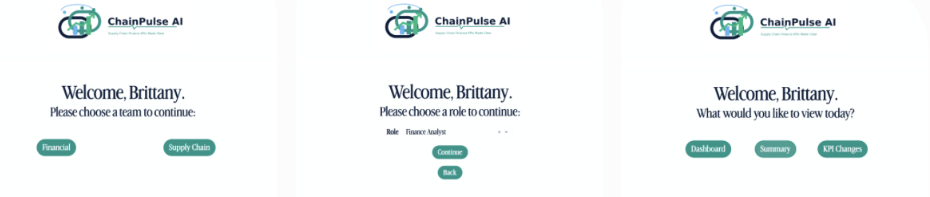
ChainPulse AI guides users through Team → Role → Task before presenting the analytics experience. That seems simple, but it changed the way I approached the build. Instead of asking, “What else can I fit on this dashboard?” I started asking, “What does this user need to do next?” That aligns closely with Sigma’s approach to user paths, which treats the application as a sequence of screens and actions rather than one static reporting page.
A Dashboard Shows You Something. An App Lets You Do Something.
Once the user reaches the analytics portion of ChainPulse AI, they can see metrics like Total Spend, Budget Variance, Average On-Time Payment Rate, Suppliers Over Budget, and spend trends.
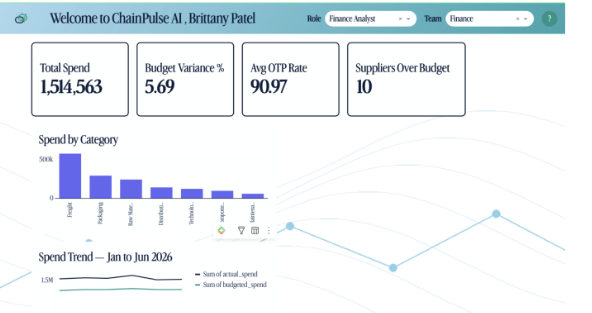
That part looks familiar. It is the type of experience most of us would recognize as a dashboard.
The more interesting part is what happens next.
The KPI Changes section allows users to review KPI targets, thresholds, definitions, and effective dates, while also providing a way to add a new KPI target.
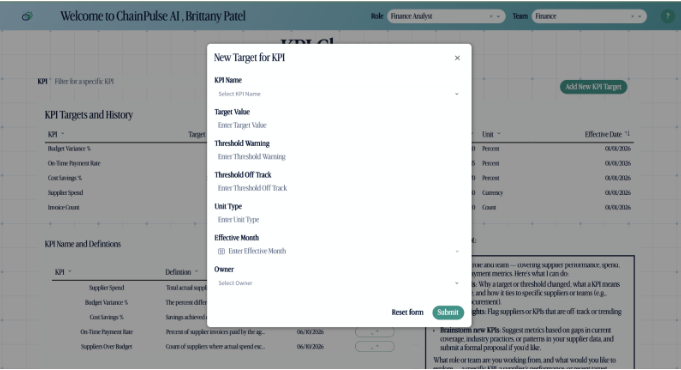
That is where the line between dashboard and application started becoming much clearer to me. Sigma’s training covers elements such as forms, modals, buttons, tabbed containers, and actions that allow users to interact with and update information instead of only consuming it.
The analytics experience can become part of the workflow itself.
Give AI a Job
We also added an AI assistant to ChainPulse AI, but I did not want a chatbot there simply so we could say the application used AI. It needed a job. The assistant helps users find specific pages or data, understand what they can view or edit, navigate to the right section, and log feedback or feature requests.
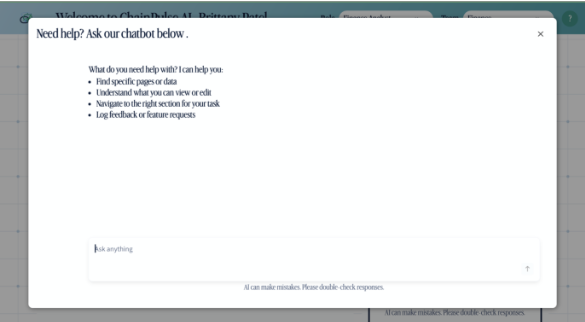
That was another important takeaway from the training for me: AI does not always need to replace the interface.
The dashboard still matters. The buttons still matter. The forms still matter.
AI can simply become another way for the user to move through the experience. Sigma describes modern workflows as a combination of application UI, logic, agents, data, tools, and actions rather than an experience driven exclusively through the UI.
Maybe We Should Stop Asking for “a Dashboard”
The biggest thing I took away from the training was not one specific Sigma feature. It was a different way to think about analytics. A stakeholder might ask for a dashboard, but what they may actually need is: Help me understand what is happening, help me decide what to do, and then let me do it without leaving the experience.
ChainPulse AI still has dashboards, KPIs, charts, and filters. But once we added roles, user paths, KPI workflows, and AI-assisted navigation, the dashboard became only one part of the product.
That is the shift I found most interesting.
Maybe the question should not only be: “What should the dashboard show?”
Maybe it should be: “What should the user be able to accomplish?”
Want to dive deeper? Connect with evolv today.